Overview
py_light_mas is a lightweight Python framework for multi-agent systems (MAS).
It provides simple abstractions for Agents, an Environnemnt, a Simulation loop, and an optional Network for inter-agent communication.
Architecture
The architecture can be illustrated in two diagrams that describe the same system:
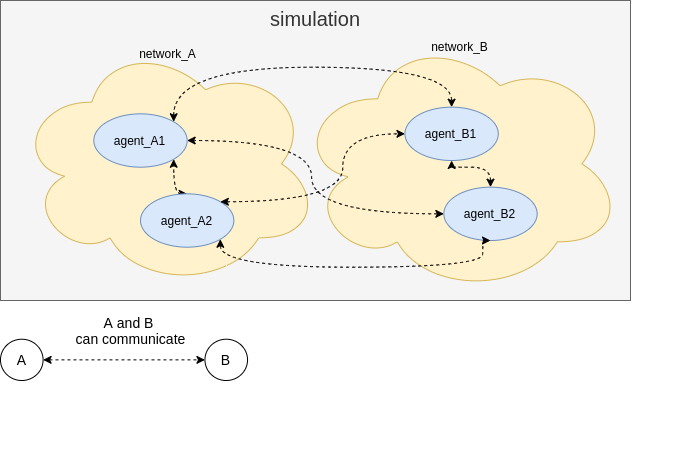
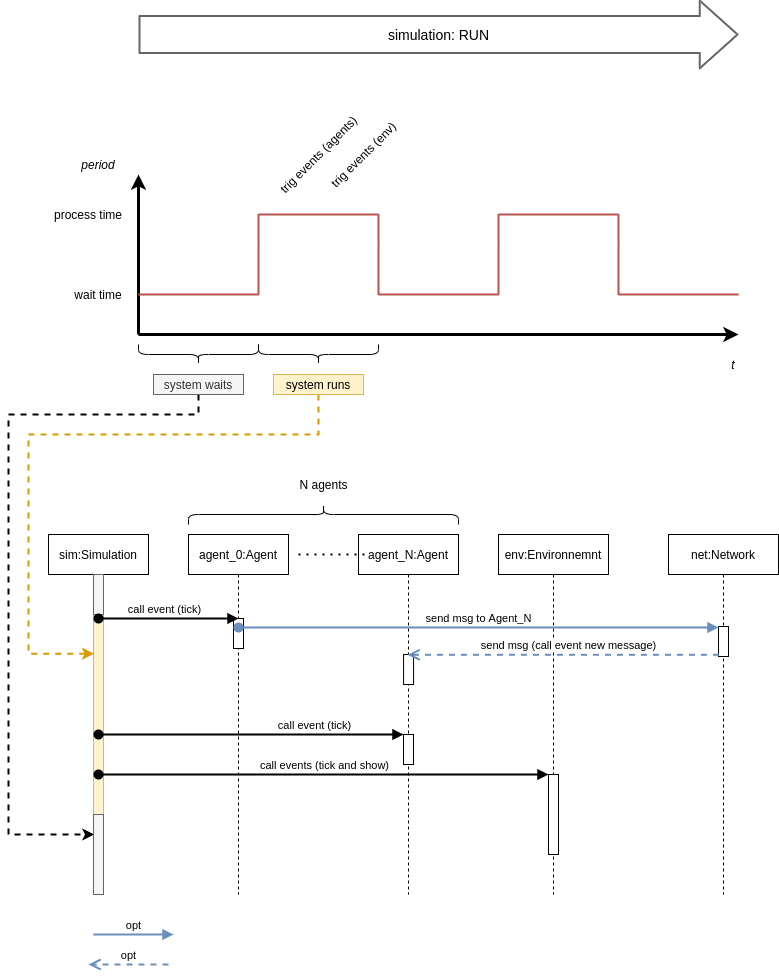
Core components
- Agent: reacts to messages, signals, and simulation ticks
- Environnemnt: maintains world state and can render or log output
- Network: optional communication channel between agents
- Simulation: runs the main loop and dispatches events
Quickstart
from py_light_mas import Simulation, Environnemnt, Agent

class MyEnv(Environnemnt):
    def on_event_new_tick(self):
        print("Environment tick")

class MyAgent(Agent):
    def on_event_new_tick(self, env):
        print(f"{self.get_name()} tick in environment")

class MySimulation(Simulation):
    def __init__(self):
        super().__init__()
        env = MyEnv("world")
        agent = MyAgent("agent1")
        self.add(env)
        self.add(agent)

# Option A: use the built-in loop
sim = MySimulation()
sim.run_loop()

# Option B: drive the loop yourself
# while True:
#     ...  # your code
#     sim.run()
#     ...
Networking example
from py_light_mas import Network

net = Network("localhost")
agent.connect(net)
Agents can send messages through the network:
agent.send("other_agent", "Hello World")
Examples
The repository includes demos with visual and console output.
Horse race
A simple race where multiple horse agents try to finish first.
Robot resource search
Robots (black) navigate to find resources (blue).
Morse chat
Two agents exchange Morse-coded messages across different networks.
[name: agent_A_01 address: team_A/192.168.0.0 network: ://team_A aid: 0 type: SenderAgent] success connection to: team_A
[name: agent_B_01 address: team_B/192.168.0.0 network: ://team_B aid: 1 type: ReplierAgent] success connection to: team_B
from: team_A/192.168.0.0 to: team_B/192.168.0.0 content: __...._.__._..__..
from: team_B/192.168.0.0 to: team_A/192.168.0.0 content: ok __...._.__._..__..
from: team_A/192.168.0.0 to: team_B/192.168.0.0 content: _..__...
from: team_B/192.168.0.0 to: team_A/192.168.0.0 content: ok _..__...
from: team_A/192.168.0.0 to: team_B/192.168.0.0 content: ._.___.___...___.
from: team_B/192.168.0.0 to: team_A/192.168.0.0 content: ok ._.___.___...___.
from: team_A/192.168.0.0 to: team_B/192.168.0.0 content: .____._.______...
from: team_B/192.168.0.0 to: team_A/192.168.0.0 content: ok .____._.______...
from: team_A/192.168.0.0 to: team_B/192.168.0.0 content: ....___.
from: team_B/192.168.0.0 to: team_A/192.168.0.0 content: ok ....___.
from: team_A/192.168.0.0 to: team_B/192.168.0.0 content: ___.____.___
from: team_B/192.168.0.0 to: team_A/192.168.0.0 content: ok ___.____.___
from: team_A/192.168.0.0 to: team_B/192.168.0.0 content: .._.__...
from: team_B/192.168.0.0 to: team_A/192.168.0.0 content: ok .._.__...
from: team_A/192.168.0.0 to: team_B/192.168.0.0 content: __.
from: team_B/192.168.0.0 to: team_A/192.168.0.0 content: ok __.
Documentation
Generate HTML API docs:
pip3 install pdoc3
./gen_doc.sh
open doc/index.html